
Messages
Total 5

system; windows 10
64
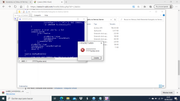
hello i have followed all the steps but it gives me this
please help me , thanks :confused:

Hello,
Please read this (Step 3 - Prepare your Windows for japanese games [IMPORTANT step])
https://www.h-suki.com/hswiki/doku.php?id=t_basics" target="_blank" title="https://www.h-suki.com/hswiki/doku.php?id=t_basics">https://www.h-suki.com/hswiki/doku.php?id=t_basics">https://www.h-suki.com/hswiki/doku.php?id=t_basics">https://www.h-suki.com/hswiki/doku.php?id=t_basics
Please read this (Step 3 - Prepare your Windows for japanese games [IMPORTANT step])
hello
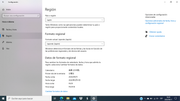
I made the changes to the region format but it still doesn't work
how can i fix it please?
thanks
Hello,
This error is typical when your Windows is not set to run japanese games, that's why it displays some weird characters
I tried the game again and it works.
You can try to run the game with LocaleEmulator to see if it's better for you.
On my build, I use:
- Windows 10 japanese mode
- Clock is set to japanese
If it's done correctly, the engine understands the japanese characters and not random characters like you have.
Start from scratch.
Use a simple and clean folder, like C:\eroge
Place the downloaded archive from hsuki in there, do the extraction and try to run the game again.
This error is typical when your Windows is not set to run japanese games, that's why it displays some weird characters
I tried the game again and it works.
You can try to run the game with LocaleEmulator to see if it's better for you.
On my build, I use:
- Windows 10 japanese mode
- Clock is set to japanese
If it's done correctly, the engine understands the japanese characters and not random characters like you have.
Start from scratch.
Use a simple and clean folder, like C:\eroge
Place the downloaded archive from hsuki in there, do the extraction and try to run the game again.