
Messages
Total 8
Hi, i have trouble running the game Boin from this Superpack
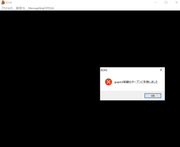
When i try to run the game i get this
[url=https://postimg.cc/mt2s1dJm]" target="_blank" title="https://postimg.cc/mt2s1dJm">[url=https://postimg.cc/mt2s1dJm]">https://postimg.cc/mt2s1dJm">[url=https://postimg.cc/mt2s1dJm] [/url]" target="_blank" title="https://i.postimg.cc/mt2s1dJm/Capture.png">[/url]">https://i.postimg.cc/mt2s1dJm/Capture.png">[/url]
When i try to run the game i get this

Hello,
Check the folder name of your game, I got an error like that when I try to run the game without setting my computer to japanese before installing it.
You can also try to copy the folder Boin from the disc and paste it in your hard drive, then you can run the game from this folder.
Check the folder name of your game, I got an error like that when I try to run the game without setting my computer to japanese before installing it.
You can also try to copy the folder Boin from the disc and paste it in your hard drive, then you can run the game from this folder.
Hi, so i've tried changing the game folder name to 'BOIN' and tried copy pasting the folder from the disc to the hard drive but still came up with the same error. I've also tried to rename to its japanese name 'ボイン' but it still doesnt run.
Hello,
Ok, let's start from the beginning:
- Did you check the basics:
https://www.h-suki.com/hswiki/doku.php?id=t_basics" target="_blank" title="https://www.h-suki.com/hswiki/doku.php?id=t_basics">https://www.h-suki.com/hswiki/doku.php?id=t_basics">https://www.h-suki.com/hswiki/doku.php?id=t_basics">https://www.h-suki.com/hswiki/doku.php?id=t_basics
Specially the libraries to install
Directx9 + Visual c++ (this game seems to use this)
- Which version of Windows do you have?
- Which method did you use to run japanese games (Locale emu or Windows japanese mode) ?
- Try to start it as an admin, may be it can help here (right click on boin.exe > run as admin)
Ok, let's start from the beginning:
- Did you check the basics:
Specially the libraries to install
Directx9 + Visual c++ (this game seems to use this)
- Which version of Windows do you have?
- Which method did you use to run japanese games (Locale emu or Windows japanese mode) ?
- Try to start it as an admin, may be it can help here (right click on boin.exe > run as admin)
Hi,
so i have all the basics down, the only difference is that it shows i have directx12 but i still downloaded the directx9 components.
Im using windows 10 set at japanese locale and have tried running as admin which led to the same result.
so i have all the basics down, the only difference is that it shows i have directx12 but i still downloaded the directx9 components.
Im using windows 10 set at japanese locale and have tried running as admin which led to the same result.
Hello,
Ok, after some tests, I got the same message when I do not set my windows clock to japanese.
Check the second block of this page:
" target="_blank" title="https://www.h-suki.com/hswiki/doku.php?id=t_change_locale_windows_en#set_the_clock_to_japanese">">https://www.h-suki.com/hswiki/doku.php?id=t_change_locale_windows_en#set_the_clock_to_japanese">https://www.h-suki.com/hswiki/doku.php? ... o_japanese">https://www.h-suki.com/hswiki/doku.php?id=t_change_locale_windows_en#set_the_clock_to_japanese
Ok, after some tests, I got the same message when I do not set my windows clock to japanese.
Check the second block of this page:


28-05-2024 07:56
I have an issue with Boin Super Pack with multiple versions. The game installed properly, had no issues running, and I was even able to get a machine translation patch working for it. However, upon reaching day 8, the game begins to skip days when attempting to select a girl. Once it hits day 12, it works again, but it always defaults to Na's route no matter what. I have tried it with and without the patch, and I can say the patch does not affect it, having replayed the entire game on fastforward in japanese up until day 8 from a fresh install.
I am on Windows 10, I do not have my computer set to Japanese nor do I have the Windows Clock set as these did not have to be done to make the game work in the first place, as I had no issues prior to day 8. I have attempted to reinstall the game, download this version as well as a different version of the same files and completely reinstall the game, and tried Windows XP Service Pack 3 compatibility mode.
I am on Windows 10, I do not have my computer set to Japanese nor do I have the Windows Clock set as these did not have to be done to make the game work in the first place, as I had no issues prior to day 8. I have attempted to reinstall the game, download this version as well as a different version of the same files and completely reinstall the game, and tried Windows XP Service Pack 3 compatibility mode.