
Messages
Total 2

hello I'm new to this so I was looking for some help if you can
I'm on Windows 10 latest version
I have my locale and clock set to japanese so no Locale Emulator
I'm having trouble installing the game
1- after downloading all 3 rar folders I unzipped them
2- I mounted ''School_Saimin_Paradise_DVD1'' to daemon tools and also tried PowerIOS
3- I ran the SETUP.exe and got the admin promt and pressed yes
4- I also tried right mouse click on the drive and used the ''install or run program from your media''
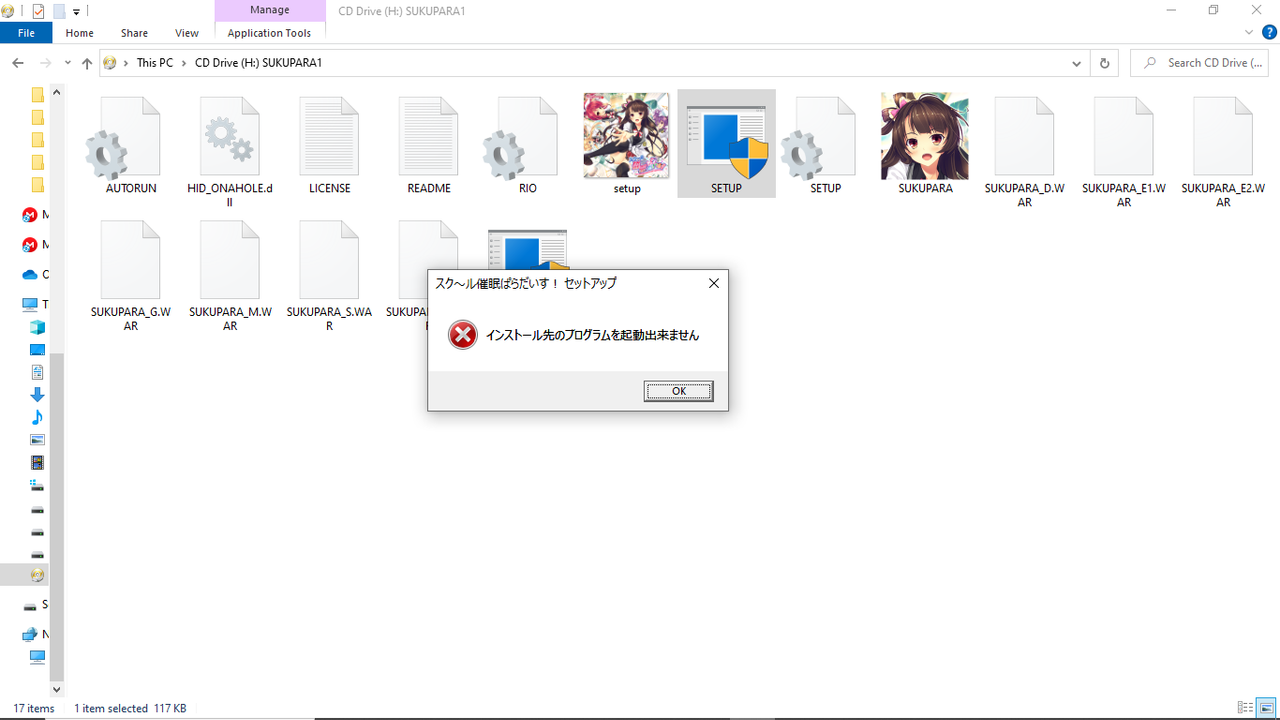
I always get an error message no matter how I run the program, the message is in japanese so I don't understand what's saying to determine what the problem is
note: other eroge run fine and install fine just this one
I'm on Windows 10 latest version
I have my locale and clock set to japanese so no Locale Emulator
I'm having trouble installing the game
1- after downloading all 3 rar folders I unzipped them
2- I mounted ''School_Saimin_Paradise_DVD1'' to daemon tools and also tried PowerIOS
3- I ran the SETUP.exe and got the admin promt and pressed yes
4- I also tried right mouse click on the drive and used the ''install or run program from your media''
I always get an error message no matter how I run the program, the message is in japanese so I don't understand what's saying to determine what the problem is
note: other eroge run fine and install fine just this one

Hello hkingu20,
Was the game already installed?
Try running the file UNINST.exe.
The message is saying that the installed program could not be started.
I'm using this website to translate:
https://www.i2ocr.com/free-online-japanese-ocr
You can also do that:
- Create a folder "Onamatope" (the name does not matter) on your hard drive
- Copy all the content from Disc1 into the folder Onamatope
- After the transfer is complete, mount the Disc2, copy all content from Disc2 in the folder Onamatope
- Run the file Setup.exe
I have tried this method, the setup is working fine (but I can install the game with disc1 too).
At least, on my computer, I can install the game and start it without any issue.
Was the game already installed?
Try running the file UNINST.exe.
The message is saying that the installed program could not be started.
I'm using this website to translate:
https://www.i2ocr.com/free-online-japanese-ocr
You can also do that:
- Create a folder "Onamatope" (the name does not matter) on your hard drive
- Copy all the content from Disc1 into the folder Onamatope
- After the transfer is complete, mount the Disc2, copy all content from Disc2 in the folder Onamatope
- Run the file Setup.exe
I have tried this method, the setup is working fine (but I can install the game with disc1 too).
At least, on my computer, I can install the game and start it without any issue.