
Messages
Total 5

17-04-2020 23:43
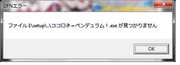
cant install this, it pop up something , like this
[url=https://postimg.cc/ygcfXYG5]" target="_blank" title="https://postimg.cc/ygcfXYG5">[url=https://postimg.cc/ygcfXYG5]">https://postimg.cc/ygcfXYG5">[url=https://postimg.cc/ygcfXYG5] [/url]" target="_blank" title="https://i.postimg.cc/ygcfXYG5/Untitled.png">[/url]">https://i.postimg.cc/ygcfXYG5/Untitled.png">[/url]

Hello donhaha1234,
It seems that there is a file that can't be found.
Can you explain what steps you have done to get this result, please?
Which Windows do you have? Windows with jp mode or localemulator?
Did you mount the file Kokorono_Pendulum.iso in Daemon tools?
Inside the new mounted disc in Windows Explorer, go to the folder setup and run install.exe.
I reinstalled the game on my side and the install/start went well.
It seems that there is a file that can't be found.
Can you explain what steps you have done to get this result, please?
Which Windows do you have? Windows with jp mode or localemulator?
Did you mount the file Kokorono_Pendulum.iso in Daemon tools?
Inside the new mounted disc in Windows Explorer, go to the folder setup and run install.exe.
I reinstalled the game on my side and the install/start went well.
19-04-2020 21:28
im using daemon tools
window 7 locale emulator
already try to run the install.exe the same screen pops up
basically mount on daemon>locale emulator used it on the japanese word app>click the first option and then the screen i showed pop up
window 7 locale emulator
already try to run the install.exe the same screen pops up
basically mount on daemon>locale emulator used it on the japanese word app>click the first option and then the screen i showed pop up
Hello,
I installed the game using Windows 7, no problem with the disc mounted with Daemon tools.
I can see the same message you have, when I'm trying to install the game directly from the hard drive (I copied the folder setup on my hard drive, then run setup.exe, then the error about a missing file is showing up).
Did you extract the iso file?
The iso file needs to be used with daemon tools directly, not to be extracted, this is not working (at least for this game).
I installed the game using Windows 7, no problem with the disc mounted with Daemon tools.
I can see the same message you have, when I'm trying to install the game directly from the hard drive (I copied the folder setup on my hard drive, then run setup.exe, then the error about a missing file is showing up).
Did you extract the iso file?
The iso file needs to be used with daemon tools directly, not to be extracted, this is not working (at least for this game).
22-04-2020 21:04
Update*
i extracted the ISO file to a hard drive, and the install works! no more error screen,
i dont know why installing using daemon tools doesnt work, maybe its my computer.
Anyways,thanks so much for helping !
i extracted the ISO file to a hard drive, and the install works! no more error screen,
i dont know why installing using daemon tools doesnt work, maybe its my computer.
Anyways,thanks so much for helping !