Message #173

Hello xgrab,
Yes, the files are created when running with a Japanese Locale setting with Locale emulator.
However, I've found difficulty running my games with just the Japanese system locale + JP clock. I've currently changed my clock format to JP as of this post. I've been facing this issue on multiple occasions: I double click the application to start the game, or the crack to run the game; and the toolbar becomes a lighter version of my current theme, and then nothing happens after that. Please check the pictures at the end of this post.
As of this issue, I've also tested the scenario of installing the game at the root of the simple folder, but the recurring problem above has made me unable to start the game. With this in mind, I tested the LocaleEmulator, and was able to open the game through the crack on my 3rd attempt.
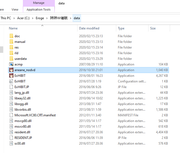
This image is before I click the crack
[url=https://postimg.cc/VdKYNV2w]" target="_blank" title="https://postimg.cc/VdKYNV2w">[url=https://postimg.cc/VdKYNV2w]">https://postimg.cc/VdKYNV2w">[url=https://postimg.cc/VdKYNV2w] [/url]" target="_blank" title="https://i.postimg.cc/VdKYNV2w/Before-Clicking.png">[/url]">https://i.postimg.cc/VdKYNV2w/Before-Clicking.png">[/url]
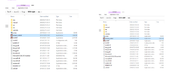
This image shows 2 pictures; On the left is the screen I get when I double click. The data in the directory path shows the ">" next to "Data", but then immediately after, it shows the picture on the right. The ">" is gone, and my title of the directory on the top (next to manage) is grayed out. Then it reverts back to the image above.
[url=https://postimg.cc/DSDnrb2Y]" target="_blank" title="https://postimg.cc/DSDnrb2Y">[url=https://postimg.cc/DSDnrb2Y]">https://postimg.cc/DSDnrb2Y">[url=https://postimg.cc/DSDnrb2Y][/url]" target="_blank" title="https://i.postimg.cc/DSDnrb2Y/Step2-3-Before-clicking.png">[/url]">https://i.postimg.cc/DSDnrb2Y/Step2-3-Before-clicking.png">[/url]
Appreciate your help so far.
EDIT:
When using Locale enulator to run in Japanese (admin or not), I get the DMP file and the exact same issue from above. Not sure if this information helps.
Yes, the files are created when running with a Japanese Locale setting with Locale emulator.
However, I've found difficulty running my games with just the Japanese system locale + JP clock. I've currently changed my clock format to JP as of this post. I've been facing this issue on multiple occasions: I double click the application to start the game, or the crack to run the game; and the toolbar becomes a lighter version of my current theme, and then nothing happens after that. Please check the pictures at the end of this post.
As of this issue, I've also tested the scenario of installing the game at the root of the simple folder, but the recurring problem above has made me unable to start the game. With this in mind, I tested the LocaleEmulator, and was able to open the game through the crack on my 3rd attempt.
This image is before I click the crack
This image shows 2 pictures; On the left is the screen I get when I double click. The data in the directory path shows the ">" next to "Data", but then immediately after, it shows the picture on the right. The ">" is gone, and my title of the directory on the top (next to manage) is grayed out. Then it reverts back to the image above.
Appreciate your help so far.
EDIT:
When using Locale enulator to run in Japanese (admin or not), I get the DMP file and the exact same issue from above. Not sure if this information helps.