
Posts
Total 13

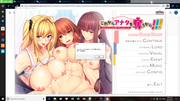
I installed this one yesterday and it seem that i could run the game. Howerver, when i chose to start a New game, i got this mistake and looked like a file is missing, can anyone help me?
[url=https://postimg.cc/QFq9xRtr]" target="_blank" title="https://postimg.cc/QFq9xRtr">[url=https://postimg.cc/QFq9xRtr]">https://postimg.cc/QFq9xRtr">[url=https://postimg.cc/QFq9xRtr] [/url]" target="_blank" title="https://i.postimg.cc/QFq9xRtr/Untitled.png">[/url]">https://i.postimg.cc/QFq9xRtr/Untitled.png">[/url]

Hello,
Did you launch the game with japanese locale on your Windows?https://www.h-suki.com/tutoriels/windows-jp.html" target="_blank" title="https://www.h-suki.com/tutoriels/windows-jp.html">https://www.h-suki.com/tutoriels/windows-jp.html">https://www.h-suki.com/tutoriels/windows-jp.html">https://www.h-suki.com/tutoriels/windows-jp.html
Or maybe with localeemulator?https://www.h-suki.com/tutoriels/app-jp.html" target="_blank" title="https://www.h-suki.com/tutoriels/app-jp.html">https://www.h-suki.com/tutoriels/app-jp.html">https://www.h-suki.com/tutoriels/app-jp.html">https://www.h-suki.com/tutoriels/app-jp.html
I've just tested the game (Windows 10 / Japanese locale) and it works.
With localeemulator, it's ok too.
Did you launch the game with japanese locale on your Windows?
Or maybe with localeemulator?
I've just tested the game (Windows 10 / Japanese locale) and it works.
With localeemulator, it's ok too.
i launched the game with japanese locale, but it still didn't work, i think i should try the other way.
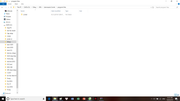
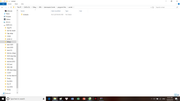
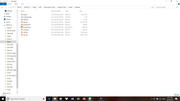
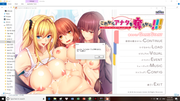
i used both way but it sill not work, i think the problem is that a file is missing as i showed you in the picture, can you check if the .rar file i download miss something, i will display it in the pictures below
[url=https://postimg.cc/94xL8TMw]" target="_blank" title="https://postimg.cc/94xL8TMw">[url=https://postimg.cc/94xL8TMw]">https://postimg.cc/94xL8TMw">[url=https://postimg.cc/94xL8TMw][/url]" target="_blank" title="https://i.postimg.cc/94xL8TMw/Untitled.png">[/url]">https://i.postimg.cc/94xL8TMw/Untitled.png">[/url]
[url=https://postimg.cc/ppNq6P2C]" target="_blank" title="https://postimg.cc/ppNq6P2C">[url=https://postimg.cc/ppNq6P2C]">https://postimg.cc/ppNq6P2C">[url=https://postimg.cc/ppNq6P2C][/url]" target="_blank" title="https://i.postimg.cc/ppNq6P2C/Untitled1.png">[/url]">https://i.postimg.cc/ppNq6P2C/Untitled1.png">[/url]
[url=https://postimg.cc/5Xggyv8K]" target="_blank" title="https://postimg.cc/5Xggyv8K">[url=https://postimg.cc/5Xggyv8K]">https://postimg.cc/5Xggyv8K">[url=https://postimg.cc/5Xggyv8K][/url]" target="_blank" title="https://i.postimg.cc/5Xggyv8K/Untitled2.png">[/url]">https://i.postimg.cc/5Xggyv8K/Untitled2.png">[/url]
[url=https://postimg.cc/0bpcghjs]" target="_blank" title="https://postimg.cc/0bpcghjs">[url=https://postimg.cc/0bpcghjs]">https://postimg.cc/0bpcghjs">[url=https://postimg.cc/0bpcghjs][/url]" target="_blank" title="https://i.postimg.cc/0bpcghjs/Untitled3.png">[/url]">https://i.postimg.cc/0bpcghjs/Untitled3.png">[/url]
[url=https://postimg.cc/rDMgqgRt]" target="_blank" title="https://postimg.cc/rDMgqgRt">[url=https://postimg.cc/rDMgqgRt]">https://postimg.cc/rDMgqgRt">[url=https://postimg.cc/rDMgqgRt][/url]" target="_blank" title="https://i.postimg.cc/rDMgqgRt/Untitled4.png">[/url]">https://i.postimg.cc/rDMgqgRt/Untitled4.png">[/url]
[url=https://postimg.cc/B8vgK6gS]" target="_blank" title="https://postimg.cc/B8vgK6gS">[url=https://postimg.cc/B8vgK6gS]">https://postimg.cc/B8vgK6gS">[url=https://postimg.cc/B8vgK6gS][/url]" target="_blank" title="https://i.postimg.cc/B8vgK6gS/Untitled5.png">[/url]">https://i.postimg.cc/B8vgK6gS/Untitled5.png">[/url]
[url=https://postimg.cc/34sCVZHN]" target="_blank" title="https://postimg.cc/34sCVZHN">[url=https://postimg.cc/34sCVZHN]">https://postimg.cc/34sCVZHN">[url=https://postimg.cc/34sCVZHN][/url]" target="_blank" title="https://i.postimg.cc/34sCVZHN/Untitled6.png">[/url]">https://i.postimg.cc/34sCVZHN/Untitled6.png">[/url]
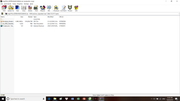
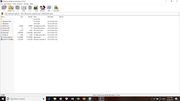
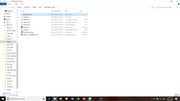
Hello,
Thanks for the pictures, i understand what is the problem and i'm able to see the same error on my computer.
The problem is that you extract the iso without installating correctly the game.
I will recap the process to install the game, the first steps are very important:
- Extract the file maj291b_KOREKANAOUBAKA.rar with Winrar
- You will have the three files you see on your first picture
- Mount the file Korekara_Anata.ISO with Daemon tools or Windows Explorer
https://www.h-suki.com/tutoriels/virtuald.html" target="_blank" title="https://www.h-suki.com/tutoriels/virtuald.html">https://www.h-suki.com/tutoriels/virtuald.html">https://www.h-suki.com/tutoriels/virtuald.html">https://www.h-suki.com/tutoriels/virtuald.html
- This will create a virtual disc drive
- Run the setup.exe from this disc drive (japanese locale or localemulator)
- Complete the setup
- Run the game
Thanks for the pictures, i understand what is the problem and i'm able to see the same error on my computer.
The problem is that you extract the iso without installating correctly the game.
I will recap the process to install the game, the first steps are very important:
- Extract the file maj291b_KOREKANAOUBAKA.rar with Winrar
- You will have the three files you see on your first picture
- Mount the file Korekara_Anata.ISO with Daemon tools or Windows Explorer
- This will create a virtual disc drive
- Run the setup.exe from this disc drive (japanese locale or localemulator)
- Complete the setup
- Run the game
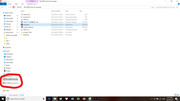
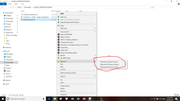
hello, you mean a disk drive like this, right? But it still not work, it got the same mistake, i did extract the .rar file by Winrar too, like you said, it gave me 3 choices to mount the file, which one should i choose, i took the first choice and i created a disk drive like in the picture.
[url=https://postimg.cc/svXc5Z2B]" target="_blank" title="https://postimg.cc/svXc5Z2B">[url=https://postimg.cc/svXc5Z2B]">https://postimg.cc/svXc5Z2B">[url=https://postimg.cc/svXc5Z2B][/url]" target="_blank" title="https://i.postimg.cc/svXc5Z2B/Untitled-LI.jpg">[/url]">https://i.postimg.cc/svXc5Z2B/Untitled-LI.jpg">[/url]
[url=https://postimg.cc/MXykgN00]" target="_blank" title="https://postimg.cc/MXykgN00">[url=https://postimg.cc/MXykgN00]">https://postimg.cc/MXykgN00">[url=https://postimg.cc/MXykgN00][/url]" target="_blank" title="https://i.postimg.cc/MXykgN00/Untitled1.png">[/url]">https://i.postimg.cc/MXykgN00/Untitled1.png">[/url]
Hello,
Yes, a disk drive like that.
I think the first option is the good one, i don't have the same version of Daemon tools as yours but i think it will do the job.
Before you proceed to the setup, please choose one of the following for running japanese setup correctly :
#1 LocaleEmulator
https://www.h-suki.com/tutoriels/app-jp.html#localemu" target="_blank" title="https://www.h-suki.com/tutoriels/app-jp.html#localemu">https://www.h-suki.com/tutoriels/app-jp.html#localemu">https://www.h-suki.com/tutoriels/app-jp.html#localemu">https://www.h-suki.com/tutoriels/app-jp.html#localemu
#2 Set your windows to japanese locale
https://www.h-suki.com/tutoriels/windows-jp.html#810" target="_blank" title="https://www.h-suki.com/tutoriels/windows-jp.html#810">https://www.h-suki.com/tutoriels/windows-jp.html#810">https://www.h-suki.com/tutoriels/windows-jp.html#810">https://www.h-suki.com/tutoriels/windows-jp.html#810
Once you did that, you have to :
- Run the setup.exe from the G: drive (the one you show me in your picture)
If you choose :
#1 LocaleEmulator -> Right click on the setup.exe > LocaleEmulator > Run in japanese (admin)
#2 Right click > Run as admin
- Follow the setup, for the installation folder, use something new and at the root of c drive (not in program files), something like that:
C:\comet\koreuba
- Complete the setup
- Run the game with the file koreuba located in the folder i've mentionned just before.
Yes, a disk drive like that.
I think the first option is the good one, i don't have the same version of Daemon tools as yours but i think it will do the job.
Before you proceed to the setup, please choose one of the following for running japanese setup correctly :
#1 LocaleEmulator
#2 Set your windows to japanese locale
Once you did that, you have to :
- Run the setup.exe from the G: drive (the one you show me in your picture)
If you choose :
#1 LocaleEmulator -> Right click on the setup.exe > LocaleEmulator > Run in japanese (admin)
#2 Right click > Run as admin
- Follow the setup, for the installation folder, use something new and at the root of c drive (not in program files), something like that:
C:\comet\koreuba
- Complete the setup
- Run the game with the file koreuba located in the folder i've mentionned just before.
Hello,
Thanks for your help but it still didn't work, my computer had been in japanese locale before so i don't think the error was caused by that.
I notice that i didn't run as admin in the previous post and i did that this time but it didn't show any difference.
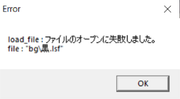
I searched about the error on google translate and it told me that the error mean the "bg\...lsf" file can't be opened (i will show the error again in the picture), i don't know if my windows can open a .lsf file or not but i'm trying to find an application to open it. Can you tell me if you find out sth new?
[url=https://postimg.cc/CRmQfD1m]" target="_blank" title="https://postimg.cc/CRmQfD1m">[url=https://postimg.cc/CRmQfD1m]">https://postimg.cc/CRmQfD1m">[url=https://postimg.cc/CRmQfD1m][/url]" target="_blank" title="https://i.postimg.cc/CRmQfD1m/Untitled.png">[/url]">https://i.postimg.cc/CRmQfD1m/Untitled.png">[/url]
Thanks for your help but it still didn't work, my computer had been in japanese locale before so i don't think the error was caused by that.
I notice that i didn't run as admin in the previous post and i did that this time but it didn't show any difference.
I searched about the error on google translate and it told me that the error mean the "bg\...lsf" file can't be opened (i will show the error again in the picture), i don't know if my windows can open a .lsf file or not but i'm trying to find an application to open it. Can you tell me if you find out sth new?
Hello,
Okay, I did some tests on my computer and I think i found the solution.
I don't know why but now i had the same problem today (error with file lsf) when I run the setup with just japanese locale activated.
There is two things you can try to solve this issue.
#1
Set the Windows' clock format to Japanese.
Control Panel > Region > Select Japanese under format dropdown list > Apply
Run the game
This one did the trick for me
#2 LocaleEmulator alternative
Install LocaleEmulator
Right click on koreuba.exe
LocaleEmulator > Run in Japanese (Admin)
This one works fine too.
Okay, I did some tests on my computer and I think i found the solution.
I don't know why but now i had the same problem today (error with file lsf) when I run the setup with just japanese locale activated.
There is two things you can try to solve this issue.
#1
Set the Windows' clock format to Japanese.
Control Panel > Region > Select Japanese under format dropdown list > Apply
Run the game
This one did the trick for me
#2 LocaleEmulator alternative
Install LocaleEmulator
Right click on koreuba.exe
LocaleEmulator > Run in Japanese (Admin)
This one works fine too.
Hello,
It finally worked, i used the locale emulator and i think the problem was solved.
One more important thing is that this time i run the koreuba.exe file in the folder C:\comet\koreuba, not the one from desktop.
Thanks for your help!
Can i ask you sth else, where are you from, are you french?
It finally worked, i used the locale emulator and i think the problem was solved.
One more important thing is that this time i run the koreuba.exe file in the folder C:\comet\koreuba, not the one from desktop.
Thanks for your help!
Can i ask you sth else, where are you from, are you french?
Hello,
Great! Good job. :thumbup:
You're right, I forgot to mention that you have to run the game directly from the game's folder not from a shortcut. It's better that way, for the other games too.
Yes, I'm french and you?
Great! Good job. :thumbup:
You're right, I forgot to mention that you have to run the game directly from the game's folder not from a shortcut. It's better that way, for the other games too.
Yes, I'm french and you?
Hello,
I had the problem with the Adebana game of astronauts too, but i think i can fix it with this solution, thanks for your help.
I'm vietnamese but if i pass the DELF B1 exam on May, i think i will be in France in August.
I had the problem with the Adebana game of astronauts too, but i think i can fix it with this solution, thanks for your help.
I'm vietnamese but if i pass the DELF B1 exam on May, i think i will be in France in August.