
Messages
Total 3

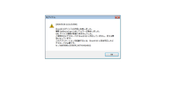
Hi I have somme issue with this game / Salut j'ai des soucis pour lancer ce jeu
[url=https://postimg.cc/pm1wTWcS]" target="_blank" title="https://postimg.cc/pm1wTWcS">[url=https://postimg.cc/pm1wTWcS]">https://postimg.cc/pm1wTWcS">[url=https://postimg.cc/pm1wTWcS] [/url]" target="_blank" title="https://i.postimg.cc/pm1wTWcS/error-mesu-idol.png">[/url]">https://i.postimg.cc/pm1wTWcS/error-mesu-idol.png">[/url]
I don't know why I got this error ( I use Vmware to emulate windows 7 X64 with the key to activate the licence ) I have installed the game / japanese unicode activate / I have installed directx 9 / and i got net framework 4.5 if someone can help me
je ne sais pas pourquoi j'ai cette erreur (j'utilise vmware pour émuler une version windows7 X64 avec la clé pour activer la licence ) j'ai installé le jeu comme indiquer / l'unicode en japonais activé / j'ai installer directx 9 avec succés / et j'ai net framework 4.5 . Si quelqu'un pouvais m'aider j'en serai vraiment reconnaissant .
I don't know why I got this error ( I use Vmware to emulate windows 7 X64 with the key to activate the licence ) I have installed the game / japanese unicode activate / I have installed directx 9 / and i got net framework 4.5 if someone can help me
je ne sais pas pourquoi j'ai cette erreur (j'utilise vmware pour émuler une version windows7 X64 avec la clé pour activer la licence ) j'ai installé le jeu comme indiquer / l'unicode en japonais activé / j'ai installer directx 9 avec succés / et j'ai net framework 4.5 . Si quelqu'un pouvais m'aider j'en serai vraiment reconnaissant .

Hello quanbe77,
Which settings do you have in the display menu of your virtual machine?
(right click on the VM > Settings > Line display)
For my VMPlayer vm, I have the option Accelerate 3D graphics enabled and 1GB allocated.
And did you install the VMware tools plugins when you are running the vm?
When the vm is on, click on player, then manage and there should be something about vmware tools, install it just in case and reboot the Windows of the vm.
Else, you can try to use the Virtualbox W7 vm I prepared for visual novels:
" target="_blank" title="https://www.h-suki.com/hswiki/doku.php?id=t_virtualbox_en#hsuki_preconfigured_virtual_machines">">https://www.h-suki.com/hswiki/doku.php?id=t_virtualbox_en#hsuki_preconfigured_virtual_machines">https://www.h-suki.com/hswiki/doku.php? ... l_machines">https://www.h-suki.com/hswiki/doku.php?id=t_virtualbox_en#hsuki_preconfigured_virtual_machines
Which settings do you have in the display menu of your virtual machine?
(right click on the VM > Settings > Line display)
For my VMPlayer vm, I have the option Accelerate 3D graphics enabled and 1GB allocated.
And did you install the VMware tools plugins when you are running the vm?
When the vm is on, click on player, then manage and there should be something about vmware tools, install it just in case and reboot the Windows of the vm.
Else, you can try to use the Virtualbox W7 vm I prepared for visual novels:
Thank you so much vmware tool wasn't installed because in the hardware setting of the virtual machine, in the virtual CD/DVD drive it was not in auto detect mode but using my "iso only" so when I was running my virtual machine on, the vmware tool option was grayed out when I tried to install it , now it's work !!