
Messages
Total 4
Hi,
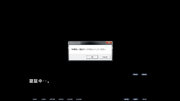
I kinda dont know wut to do after dis shows up.
[url=https://postimg.cc/jCG6NS3V]" target="_blank" title="https://postimg.cc/jCG6NS3V">[url=https://postimg.cc/jCG6NS3V]">https://postimg.cc/jCG6NS3V">[url=https://postimg.cc/jCG6NS3V] [/url]" target="_blank" title="https://i.postimg.cc/jCG6NS3V/1.png">[/url]">https://i.postimg.cc/jCG6NS3V/1.png">[/url]
I kinda dont know wut to do after dis shows up.

Hello,
Did you set the clock format of Windows to japanese?
To do that:
# Control Panel
# Region and Language
# Format tab > Select Japanese > Apply & OK
Did you set the clock format of Windows to japanese?
To do that:
# Control Panel
# Region and Language
# Format tab > Select Japanese > Apply & OK
Hi.
Thanks for the reply.
I tried what u said but the result is the same.
I also tried using Locale Emulator and NoRegion Loader to crack it open but it's still like dis.
Thanks for the reply.
I tried what u said but the result is the same.
I also tried using Locale Emulator and NoRegion Loader to crack it open but it's still like dis.
Hello 92557116,
I installed the game again and i don't have this issue, I didn't do anything special, here is my setup:
- Windows 10 updated
- Game installed at the root of C:\ (not in program files)
- No antivirus program besides Windows Defender
- Windows set to japanese mode
https://www.h-suki.com/tutoriels/windows-jp.html#810" target="_blank" title="https://www.h-suki.com/tutoriels/windows-jp.html#810">https://www.h-suki.com/tutoriels/windows-jp.html#810">https://www.h-suki.com/tutoriels/windows-jp.html#810">https://www.h-suki.com/tutoriels/windows-jp.html#810
- Don't have to use NoRegionLoader, just click cancel twice at startup.
- I run the game as admin if that can help.
Tested with Locale Emulator, it works too.
I'm not able to have the same error. o_o
I installed the game again and i don't have this issue, I didn't do anything special, here is my setup:
- Windows 10 updated
- Game installed at the root of C:\ (not in program files)
- No antivirus program besides Windows Defender
- Windows set to japanese mode
- Don't have to use NoRegionLoader, just click cancel twice at startup.
- I run the game as admin if that can help.
Tested with Locale Emulator, it works too.
I'm not able to have the same error. o_o