
Posts
Total 6

Hello,
All links work perfectly, no problem during extraction and during installation. The game runs fine too.
Can you show me the japanese message you have during the setup, please?
In the past, someone had an issue with appetite game with a problem similar and it was something related to the registry database of Windows.
The game wasn't properly installed/uninstalled.
Can you try this file, it will remove the installation information from the registry :
" target="_blank" title="https://www.h-suki.com/downloadext/uninstall_jimimena.rar">">https://www.h-suki.com/downloadext/uninstall_jimimena.rar">https://www.h-suki.com/downloadext/unin ... mimena.rar">https://www.h-suki.com/downloadext/uninstall_jimimena.rar
Then retry the installation and this time try to run the setup.exe with administrator rights.
All links work perfectly, no problem during extraction and during installation. The game runs fine too.
Can you show me the japanese message you have during the setup, please?
In the past, someone had an issue with appetite game with a problem similar and it was something related to the registry database of Windows.
The game wasn't properly installed/uninstalled.
Can you try this file, it will remove the installation information from the registry :
Then retry the installation and this time try to run the setup.exe with administrator rights.

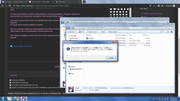
this is the message
[url=https://postimg.cc/dkTXFkf7]" target="_blank" title="https://postimg.cc/dkTXFkf7">[url=https://postimg.cc/dkTXFkf7]">https://postimg.cc/dkTXFkf7">[url=https://postimg.cc/dkTXFkf7] " target="_blank" title="https://i.postimg.cc/dkTXFkf7/01.jpg">">https://i.postimg.cc/dkTXFkf7/01.jpg">
[url=https://postimg.cc/64XHNHRS]" target="_blank" title="https://postimg.cc/64XHNHRS">[url=https://postimg.cc/64XHNHRS]">https://postimg.cc/64XHNHRS">[url=https://postimg.cc/64XHNHRS][/url]" target="_blank" title="https://i.postimg.cc/64XHNHRS/02.jpg">[/url]">https://i.postimg.cc/64XHNHRS/02.jpg">[/url]
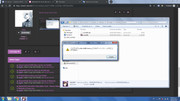
and this is the uninstaller's
and this is the uninstaller's
Hello,
On the first pic, it seems to tell you that the game is already installed so the message asks you to uninstall it before.
On the second pic, the program is 64bit based so it won't work on your Windows, that is, i guess, x86 32bit.
I've tested the game under Windows XP 32 bit to check if there is a problem with x86 Windows, but the game runs perfectly fine on it.
There is two things you can try :
#1 Idea
I've created an archive with the game fully extracted, so there is no setup to run, just the game.
Here is the link :
" target="_blank" title="https://mega.nz/#!9phSWYIb!ZAzjJ5sgiAym_BiKAMzhOAmGtTTK5kfKWYqfR8f0Rws">">https://mega.nz/#!9phSWYIb!ZAzjJ5sgiAym_BiKAMzhOAmGtTTK5kfKWYqfR8f0Rws">https://mega.nz/#!9phSWYIb!ZAzjJ5sgiAym ... YqfR8f0Rws">https://mega.nz/#!9phSWYIb!ZAzjJ5sgiAym_BiKAMzhOAmGtTTK5kfKWYqfR8f0Rws
If it works, keep the archive unextracted, run the uninstall.exe of this file just to check if it can remove the game properly.
Run the file JimiJijyo.exe
#2 Idea
Use the program Uniextract:
" target="_blank" title="https://github.com/Bioruebe/UniExtract2/releases/download/v2.0.0-rc.2/UniExtractRC2.zip">">https://github.com/Bioruebe/UniExtract2/releases/download/v2.0.0-rc.2/UniExtractRC2.zip">https://github.com/Bioruebe/UniExtract2 ... actRC2.zip">https://github.com/Bioruebe/UniExtract2/releases/download/v2.0.0-rc.2/UniExtractRC2.zip
Extract the file in a folder like :
C:\Uniextract
Put your game's folder (first archive you download from HSuki, the one with setup.Exe and setup-1.bin) at the root of C: (to avoid problem with the length of chars) :
C:\Jime me na Jijo-san no Oshigo Sex
Run Uniextract, complete the first steps of configuration, then the program will tell you to select a file, select the file setup.exe.
This tool will extract the contents of the file setup-1.bin, there you will have the game without the need to install it.
Run the file JimiJijyo.exe
Both methods work on my side.
On the first pic, it seems to tell you that the game is already installed so the message asks you to uninstall it before.
On the second pic, the program is 64bit based so it won't work on your Windows, that is, i guess, x86 32bit.
I've tested the game under Windows XP 32 bit to check if there is a problem with x86 Windows, but the game runs perfectly fine on it.
There is two things you can try :
#1 Idea
I've created an archive with the game fully extracted, so there is no setup to run, just the game.
Here is the link :
If it works, keep the archive unextracted, run the uninstall.exe of this file just to check if it can remove the game properly.
Run the file JimiJijyo.exe
#2 Idea
Use the program Uniextract:
Extract the file in a folder like :
C:\Uniextract
Put your game's folder (first archive you download from HSuki, the one with setup.Exe and setup-1.bin) at the root of C: (to avoid problem with the length of chars) :
C:\Jime me na Jijo-san no Oshigo Sex
Run Uniextract, complete the first steps of configuration, then the program will tell you to select a file, select the file setup.exe.
This tool will extract the contents of the file setup-1.bin, there you will have the game without the need to install it.
Run the file JimiJijyo.exe
Both methods work on my side.